Built around your workflow

Your software fits everyone. What if it fit you?

You pay for a whole platform. Your team uses a handful of features. We replace your internal subscriptions with a custom tool that keeps the useful parts, fits your process, and cuts the busywork.

Kylo Control Center dashboard overview

The same core features.
A better way to work.

Start with one internal workflow. We map what your team actually uses, preserve what works, and design the replacement around the places work gets stuck.

PHASE 01

Map what you use and what you pay.

List the tools supporting your workflow. We look at the features you use, the bills you pay, and where your team needs workarounds.

Output: A clear breakdown of spending, used features and replacement opportunities.

PHASE 02

Make the replacement clear before building.

Agree the core features, integrations and migration. See how the new workflow fits together, what it costs, and where useful AI could help.

Output: A roadmap you can build from yourself or ask Kylo to deliver.

PHASE 03

Replace the subscriptions. Keep the useful parts.

Build the forms, records, approvals and views your team relies on, tailored to your roles and process. Connect your own data and the integrations agreed in scope.

Output: A custom internal tool with the core functionality your team needs.

PHASE 04

Show your team exactly where each step went.

We map the previous workflow screen by screen and show staff how to do each step in the replacement. Training follows their actual work, with ongoing support scoped on the call.

Output: A familiar process, improved for your team, with a clear path through the change.

Start with a free audit

No commitment. 30 minutes.

Keep the useful parts.

Examples of workflows we can explore in your audit. These are illustrative possibilities, not client case studies.

REQUESTS & APPROVALS

One place to submit. A clear next step.

Keep your forms and approval rules. Bring requests, ownership and status together so staff spend less time copying information and chasing updates.

PROJECTS & TASKS

Track the work your team actually does.

Keep the boards, deadlines and views you use. Fit the fields and handoffs to your process, without paying for the rest of a large platform.

RECORDS & REPORTING

Your data. Your views. Your decisions.

Build the records and reports your team relies on using your own connected data. Make useful information easier to find and recurring reporting simpler to prepare.

TEAM COORDINATION

Make the handoff easier.

Keep the schedules, notifications and shared views that matter. Design the replacement around who does what and what needs to happen next.

Explore your replacement estimate

Your workflow comes first.

Start with the steps your team already takes.
Keep the core features. Improve the parts that slow them down.
Add AI where it helps a real task, with people in control.

Your team sees exactly how the replacement works. Training maps each old workflow step to the new tool, using your own process as the guide.
Your team stays in control. Your team keeps the decisions and approvals. AI can help with useful tasks where agreed in scope.
Your data and access need a clear plan. We agree permissions, data handling and integration requirements before migration or launch.
Measure the work that matters. Track useful measures such as approval time, repeated entry and completed requests, with a baseline from your actual workflow.
The tool can grow with your team. New features and improvements can be scoped as your workflows change, rather than paying for a bigger platform.
Clear visibility where you need it. Bring relevant status, owners and alerts into the views your team actually uses.
Know what you are replacing before committing. Your audit maps the used features, replacement scope, migration and exact costs so you can make an informed decision.
Book a Free Audit

No commitment. 30 minutes.

See your savings. Keep control.

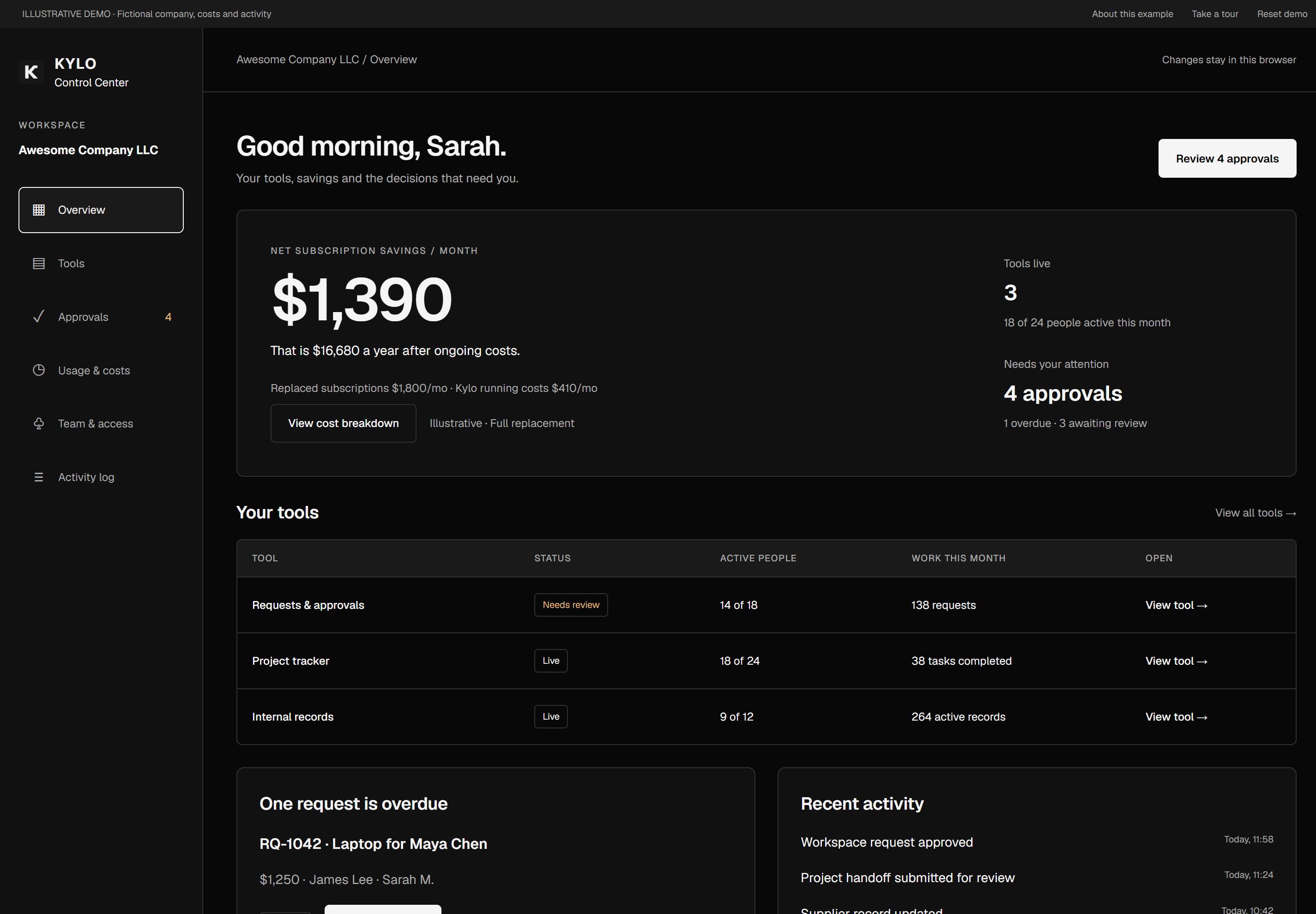
Your teams work in tools built around the features they need. The Control Center gives managers one view of subscription savings, usage, approvals and activity across those tools.

Kylo Control Center illustrative demo dashboard

Illustrative demo with sample data; not a client case study or evidence of measured savings.

Subscription savings

Compare replaced subscriptions with the ongoing costs of your tailored tools.

Team adoption

See who uses each tool and where the team needs help or clearer workflows.

Decisions & ownership

Review approvals with their context, owners and decision history in one place.

Access & activity

Review business roles and relevant changes. Kylo handles technical maintenance.

Interactive demo · Sample company data · No signup required. Control Center setup is included with three or more tools/workflows commissioned together; optional for smaller projects.

Start with what you already spend.

A rough estimate helps start the conversation. An exact quote follows the workflow audit.

We map your current software costs and used features, then show what a replacement could include. Leave with a clear breakdown and roadmap: build from it yourself or ask Kylo to deliver the tool.

Claim your free audit

The calculator uses 20% of your current yearly software spend as an indicative one-off build estimate. This is an illustration, not a quote. A monthly support retainer and exact scope are discussed on your call.

Try the calculator →
PER PROJECT

A focused replacement.
Built for your team.

Agree the features your team needs, the integrations and the migration plan. We quote the build before starting, then design, implement and train your team on the replacement.

· Workflow and software-spend audit · Used-feature breakdown and replacement roadmap · Scoped design, build and deployment · Agreed data migration and integrations · Previous-workflow mapping · Employee training and onboarding

Get a quote

Exact scope and price are confirmed after the audit. Calculator figures are illustrative estimates.

ONGOING SUPPORT

Keep it useful
as work changes.

Discuss a small monthly retainer for maintenance and agreed improvements, tailored to the tool and your needs.

· Maintenance and support scoped on the call · Hosting and integration costs made clear · Agreed upgrades and improvements · New features scoped as your needs change

Ask about maintenance

One-off build plus a monthly support retainer discussed on your call. Exact pricing, inclusions and replacement feasibility are confirmed before you commit.

Straight answers.

No jargon. No waffle.

The used functionality of internal software: forms, records, approvals, task views, reports and similar team workflows. We scope one workflow first and confirm which subscriptions can be replaced. Public-facing products and heavily regulated tools are outside this offer.

That is the starting point. We map the features your team relies on, preserve the core functionality, and personalise fields, roles and steps to your process. Features that depend on third-party proprietary data or licences need separate consideration.

The calculator uses 20% of your current yearly software spend as an illustrative build estimate, plus a clearly labelled monthly support allowance for comparison. It is not a quote. Your audit confirms scope, feasibility, integrations, migration and exact build and recurring costs.

We map your previous workflow screen by screen, then show exactly where and how to do each step in the replacement. Training follows the work your staff already knows, with the agreed improvements explained in context.

We plan data handling, permissions, migration and integrations during scoping. The replacement uses your own records and authorised connected data. We confirm access and any third-party restrictions before committing to replacement.

No. The first job is to make the internal tool useful and easier to work with. AI is added where it helps a real task and makes sense for your data and workflow, with clear controls for your team.

Timeline depends on the agreed features, integrations and migration. You receive a plan before the build starts. Maintenance, hosting and future improvements are scoped on the call, including the monthly support retainer.

Still got questions? Just ask.